> ## Documentation Index
> Fetch the complete documentation index at: https://docs.superun.ai/llms.txt
> Use this file to discover all available pages before exploring further.
# WeChat Mini Program
> Publish a project as a WeChat Mini Program and preview or upload it from superun.
Open the tutorial in WeChat and follow it to configure the plugin, preview the Mini Program, and upload the package.
## How the integration works
A WeChat Mini Program is a lightweight application that runs inside WeChat. Unlike a regular H5 page in a browser, it runs in WeChat's container and can use supported `wx.*` APIs.
With superun, you start from a published H5 project. The WeChat Mini Program plugin packages it in a Mini Program that uses the `web-view` component, then lets you preview and upload the package without opening WeChat DevTools.
WeChat does not allow personal-subject Mini Programs to use `web-view`. This integration therefore requires a Mini Program registered to an eligible organization, such as a company. See the [official `web-view` documentation](https://developers.weixin.qq.com/miniprogram/dev/component/web-view.html).
## What you need before setup
Prepare these items in the [WeChat Official Accounts Platform](https://mp.weixin.qq.com/):
| Item | Format | Purpose | Where to find it |
| ------------------------------------------------------------------------------------------------------------------- | -------------------------------------------- | ---------------------------------------------------------- | ------------------------------------------------------------- |
| AppID | 18-character identifier | Identifies the Mini Program linked to your superun project | Development → Development Settings → Developer ID |
| [Code-upload key](https://developers.weixin.qq.com/miniprogram/dev/devtools/ci.html) | `private.{appid}.key`, a PEM RSA private key | Authorizes superun to upload a preview or release package | Development → Development Settings → Mini Program Code Upload |
| [Business-domain verification file](https://developers.weixin.qq.com/miniprogram/dev/framework/ability/domain.html) | `MP_verify_xxxx.txt` | Proves that you control the H5 domain loaded by `web-view` | Development → Development Settings → Business Domain |
The AppID identifies the Mini Program, the upload key authorizes package uploads, and the verification file authorizes the H5 domain used by `web-view`.
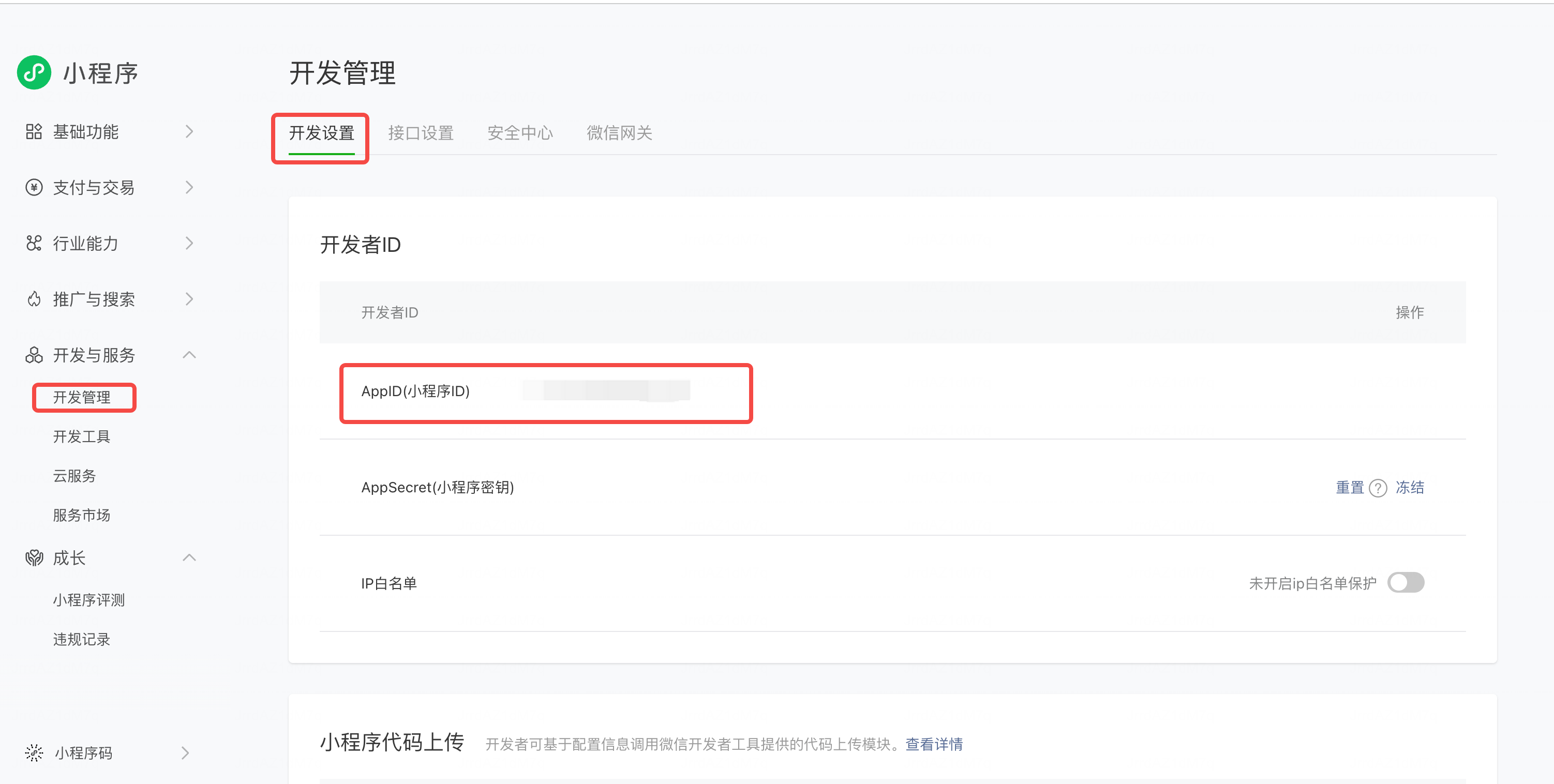
## 1. Get the AppID
1. Sign in to the WeChat Official Accounts Platform as an administrator.
2. Open **Development → Development Settings**.
3. Find **Developer ID** and copy the Mini Program AppID.
4. Paste it into the WeChat Mini Program plugin settings in superun.
 ## 2. Generate the code-upload key
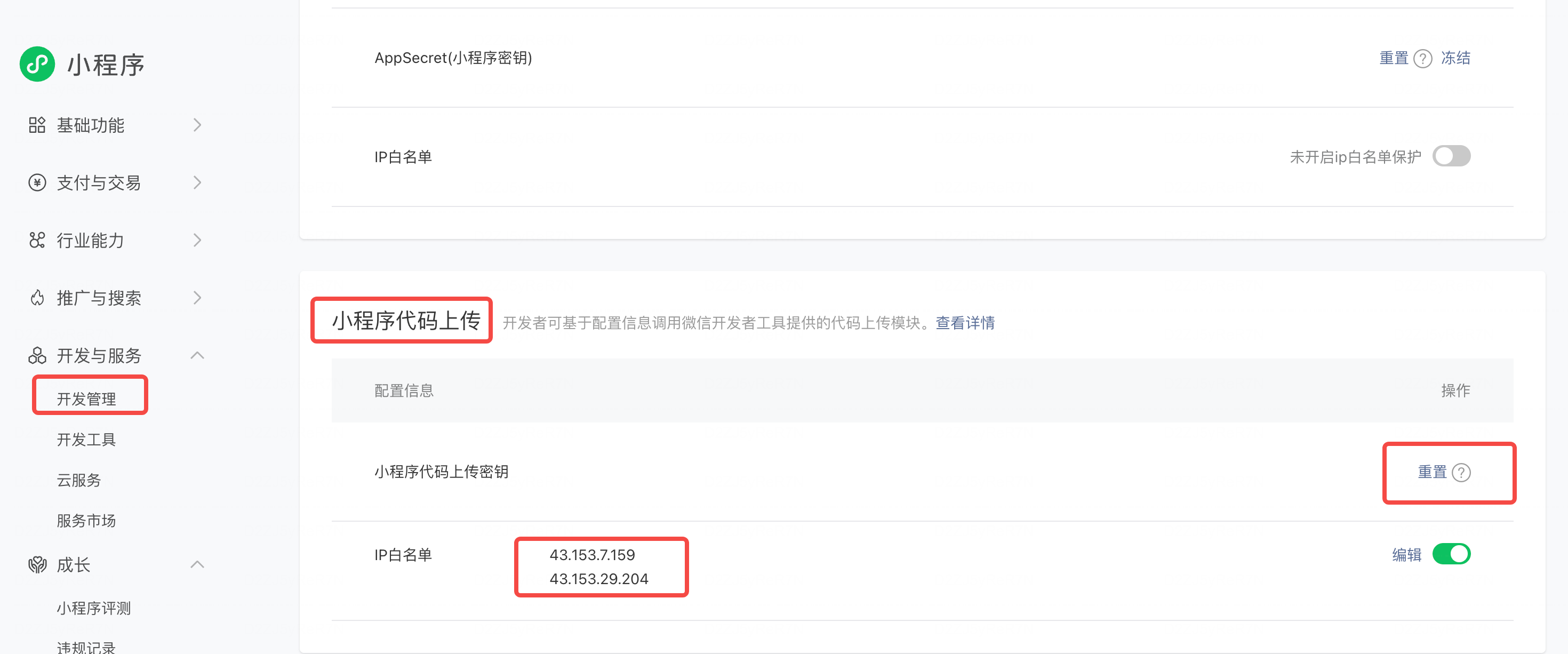
Only a Mini Program administrator can generate or reset this key.
1. In **Development Settings**, find **Mini Program Code Upload**.
2. Select **Generate**. If an earlier key has been lost, select **Reset**; resetting immediately invalidates the old key.
3. Save the downloaded `private.{appid}.key` file. It is a PEM RSA private key and begins with `-----BEGIN RSA PRIVATE KEY-----`.
4. Upload the key in the superun plugin. Do not paste the private key into project chat or commit it to a repository.
### Configure the IP allowlist
Add every outbound IP shown on the superun Mini Program plugin page to the **IP allowlist** in the same WeChat settings section. If the allowlist is missing or incomplete, WeChat may reject the upload with error `40164`.
```text theme={null}
198.51.100.1
198.51.100.2
```
The addresses above only demonstrate the required format. Always use the current IP list shown in superun.
## 2. Generate the code-upload key
Only a Mini Program administrator can generate or reset this key.
1. In **Development Settings**, find **Mini Program Code Upload**.
2. Select **Generate**. If an earlier key has been lost, select **Reset**; resetting immediately invalidates the old key.
3. Save the downloaded `private.{appid}.key` file. It is a PEM RSA private key and begins with `-----BEGIN RSA PRIVATE KEY-----`.
4. Upload the key in the superun plugin. Do not paste the private key into project chat or commit it to a repository.
### Configure the IP allowlist
Add every outbound IP shown on the superun Mini Program plugin page to the **IP allowlist** in the same WeChat settings section. If the allowlist is missing or incomplete, WeChat may reject the upload with error `40164`.
```text theme={null}
198.51.100.1
198.51.100.2
```
The addresses above only demonstrate the required format. Always use the current IP list shown in superun.
 Treat the upload key as a deployment credential. WeChat shows the private key only when it is downloaded. If it is lost, reset it and upload the replacement to superun. Never add it to a public or private code repository.
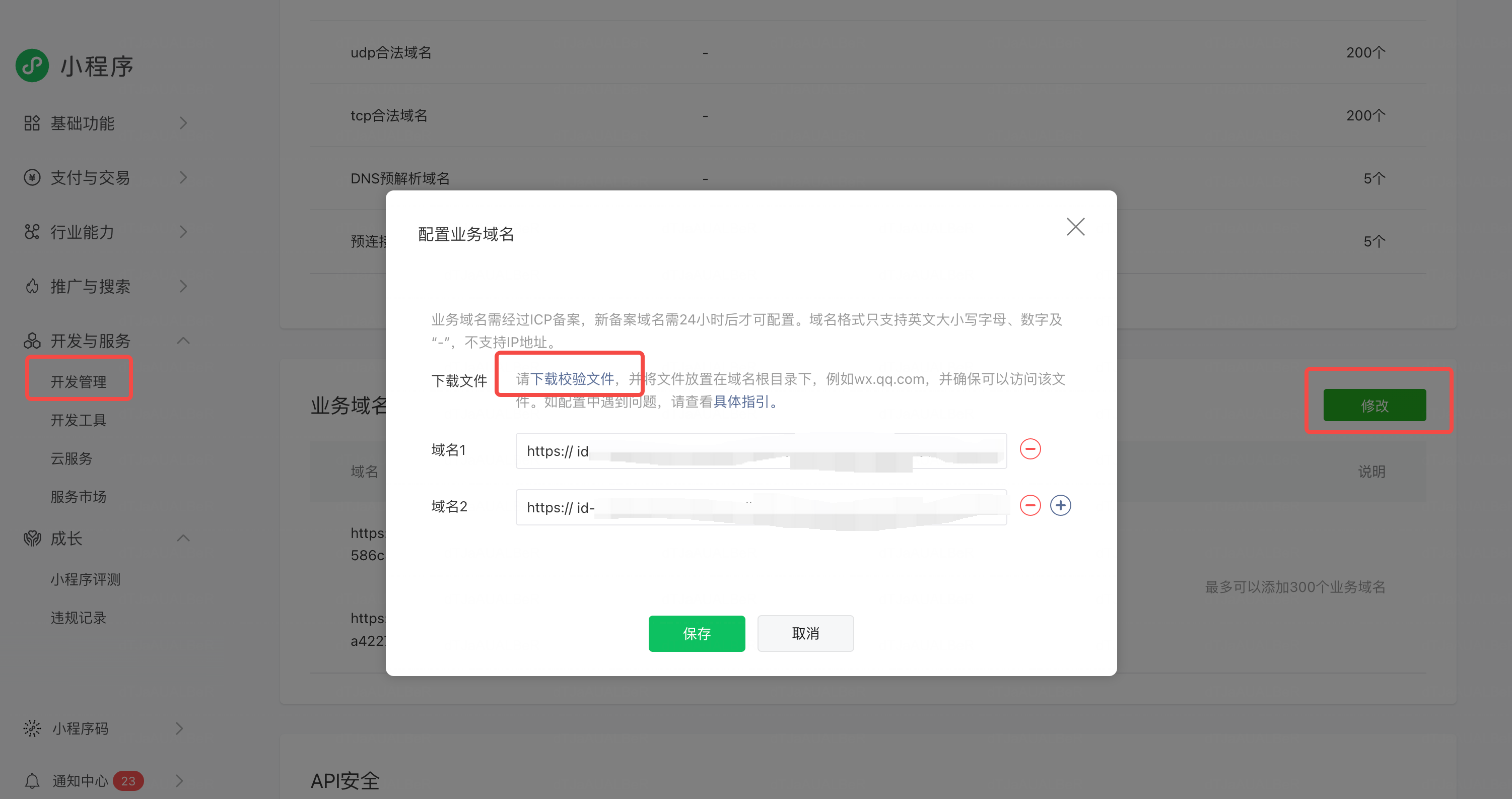
## 3. Verify the business domain
1. In **Development Settings**, find **Business Domain** and select **Edit** or **Start configuration**.
2. Download the verification file, such as `MP_verify_AbCdEf123456.txt`.
3. Place it at the public root of the H5 site. For example, `https://your-domain.example/MP_verify_AbCdEf123456.txt` must return the original file directly.
4. Enter only the host in WeChat—without a scheme or path—and save it.
The hosting method can vary, but the filename, case, and file contents must remain unchanged. Exclude the file from SPA fallback rules so it is returned as plain text rather than the application's HTML page.
Treat the upload key as a deployment credential. WeChat shows the private key only when it is downloaded. If it is lost, reset it and upload the replacement to superun. Never add it to a public or private code repository.
## 3. Verify the business domain
1. In **Development Settings**, find **Business Domain** and select **Edit** or **Start configuration**.
2. Download the verification file, such as `MP_verify_AbCdEf123456.txt`.
3. Place it at the public root of the H5 site. For example, `https://your-domain.example/MP_verify_AbCdEf123456.txt` must return the original file directly.
4. Enter only the host in WeChat—without a scheme or path—and save it.
The hosting method can vary, but the filename, case, and file contents must remain unchanged. Exclude the file from SPA fallback rules so it is returned as plain text rather than the application's HTML page.
 The superun plugin shows the recommended business-domain value for the current project.
## Preview and upload requirements
Preview and upload use two separate checks:
| Setting | Used for | If missing |
| --------------- | ----------------------------------------------------- | ------------------------------------------------------------------- |
| IP allowlist | Calls from superun to WeChat's code-upload API | Upload can be rejected, commonly with `40164` |
| Business domain | Loading the H5 project in the Mini Program `web-view` | The preview may show a blank page or an unauthorized-domain message |
After both are configured:
* Select **Preview** on the plugin page to build the package and generate a QR code for testing in WeChat.
* Select **Upload** to send the package to the WeChat Official Accounts Platform. You can then manage testing and review from WeChat's version management page.
Button labels and positions may change; follow the current product interface.
## Troubleshoot business-domain verification
If WeChat reports a verification failure or a temporary system error, check the following:
1. The verification URL is public, uses HTTPS, and is at the domain root.
2. The filename, capitalization, extension, and contents are unchanged and contain no BOM, HTML, or added markup.
3. SPA, CDN, or proxy rules do not rewrite the request to another page.
4. The TLS certificate is valid and the endpoint is compatible with WeChat's current TLS requirements.
5. The file responds quickly and does not depend on a slow cold start.
6. Domain capitalization and redirects match the business domains configured in WeChat.
For more detail, see WeChat's [verification troubleshooting guidance](https://developers.weixin.qq.com/community/develop/doc/0000a423770ed0c6d80323d6c6b009?%2Fblogdetail%3Faction=get_post_info).
The superun plugin shows the recommended business-domain value for the current project.
## Preview and upload requirements
Preview and upload use two separate checks:
| Setting | Used for | If missing |
| --------------- | ----------------------------------------------------- | ------------------------------------------------------------------- |
| IP allowlist | Calls from superun to WeChat's code-upload API | Upload can be rejected, commonly with `40164` |
| Business domain | Loading the H5 project in the Mini Program `web-view` | The preview may show a blank page or an unauthorized-domain message |
After both are configured:
* Select **Preview** on the plugin page to build the package and generate a QR code for testing in WeChat.
* Select **Upload** to send the package to the WeChat Official Accounts Platform. You can then manage testing and review from WeChat's version management page.
Button labels and positions may change; follow the current product interface.
## Troubleshoot business-domain verification
If WeChat reports a verification failure or a temporary system error, check the following:
1. The verification URL is public, uses HTTPS, and is at the domain root.
2. The filename, capitalization, extension, and contents are unchanged and contain no BOM, HTML, or added markup.
3. SPA, CDN, or proxy rules do not rewrite the request to another page.
4. The TLS certificate is valid and the endpoint is compatible with WeChat's current TLS requirements.
5. The file responds quickly and does not depend on a slow cold start.
6. Domain capitalization and redirects match the business domains configured in WeChat.
For more detail, see WeChat's [verification troubleshooting guidance](https://developers.weixin.qq.com/community/develop/doc/0000a423770ed0c6d80323d6c6b009?%2Fblogdetail%3Faction=get_post_info).